

A couple keep their bitcoin savings behind one 24-word phrase, written on a card in a kitchen drawer. A burglar who opens the drawer, a fire, or a relative who photographs the card is enough to lose everything. Learning how to set up a crypto wallet that needs signatures from M of N authorised keys before funds can move, such as any two of three. It protects against a lost or stolen key, but not against signers approving a disguised transaction.">multisig wallet changes that arithmetic: in a 2-of-3, one key stays at home, one sits in a bank box, one is with a sister, and no single place or person can move the coins.
The same logic protects a small team. A five-person open-source project that keeps its grant money in one browser wallet on the treasurer’s laptop loses it all if that laptop is compromised. With a treasury that needs three signatures out of five, one stolen laptop is worth nothing to the thief.
This lesson builds both. First a 2-of-3 Bitcoin wallet with three hardware devices from different makers and a coordinator program, then a Safe account on Ethereum, with a look at Squads on Solana. Everything is done on a test network first, real money comes only in small amounts, and every cost below carries its date. The previous lesson, on how to verify a token contract, met a multisig already: the owner of USDT is an on-chain multisig that needs three signatures out of six. Here you build your own. Nothing in this lesson is investment advice.
One seed is a single point of failure; a multisig spreads the risk
A multisig (multi-signature) wallet holds funds that can only move when a set number of keys sign. The setup is written m-of-n: n keys exist, m of them must sign. In a 2-of-3 there are three signers, the threshold (also called the quorum) is two, and any two of the three keys are enough. Each key is an ordinary private key with its own seed phrase, usually on its own hardware wallet.
Everything the path taught about a single seed still applies to each of the three: how it is written, stored, protected with a passphrase or split into shares. Our lesson on seed phrase security covers that, and this lesson does not repeat it. What changes is that no single seed is enough any more, so losing one is an inconvenience and stealing one is useless.
What a multisig protects against, and what it does not
You remove one kind of risk and take on others. The danger moves from one piece of paper to three places: the setup file that describes the wallet, the screens you trust when you sign, and the people and places that hold the keys.
| Threat | 2-of-3 multisig | Why |
|---|---|---|
| One seed or device lost, burnt or forgotten | Protected | The other two keys still reach the threshold |
| One seed stolen or photographed | Protected | One key alone cannot sign |
| Malware on one computer | Protected if each key signs on its own device | The attacker needs a second key |
| One person threatened or coerced | Partly | Only if the other keys are out of that person’s reach |
| Two key holders acting together | Not protected | Two of three is the threshold |
| All keys kept in the same house | Not protected | One burglary or fire reaches the quorum |
| The same poisoned interface shown to every signer | Not protected | Each signer approves the false transaction (the Bybit case) |
| Setup file (descriptor) lost with one key | Not protected | Two seeds without the third public key cannot rebuild the wallet |
| Bug in a wallet, firmware or contract | Not protected | Every signer runs the same flawed code |
How a multisig works on Bitcoin: a script, not an account
On Bitcoin a multisig is not an account with settings. It is a spending condition written into the output that holds the coins: a script listing the public keys and the threshold, which the network checks when someone tries to spend.
From bare multisig to P2SH and P2WSH
The mechanics were covered in our lesson on Bitcoin transactions and scripts: OP_CHECKMULTISIG, the extra item it pops by mistake, and the 15-key limit of P2SH. In short, Gavin Andresen’s BIP-11, assigned in October 2011, made m-of-n outputs standard, with a 2-of-3 escrow between buyer, seller and agent as its example. BIP-16 then hid the script behind a hash (P2SH), with rules applied to blocks from 1 April 2012, and its 520-byte limit caps a P2SH multisig at 15 public keys.
SegWit added P2WSH, where the output commits to a 32-byte SHA-256 hash of the script and the script itself goes into the witness, as our lesson on SegWit and Taproot explains. P2WSH is what most multisig wallets create today. Two more standards make wallets agree with each other. BIP-67 sorts the public keys, so the same keys and threshold always give the same address whatever order they were entered in. BIP-48 fixes the derivation path for multisig keys, m/48’/0’/0’/2′ for native SegWit P2WSH on mainnet, which it calls the recommended default.
Taproot multisig and MuSig2 are still rare in wallets
Taproot opened two newer routes. The first is a script multisig inside a Taproot output, written multi_a() or sortedmulti_a() in descriptors (BIP-387, status Deployed, up to 999 keys). The second is key aggregation with MuSig2 (BIP-327), where several keys produce one signature and the output looks, in the BIP’s words, indistinguishable from a regular single-signer Taproot output.
MuSig2 has a limit that product pages tend to leave out. BIP-327 states it plainly: “MuSig2 is a n-of-n multi-signature scheme and not a t-of-n threshold-signature scheme.” A 2-of-3 with MuSig2 has to be built from several 2-of-2 combinations, one in the key path and the others in script paths. Ledger added MuSig2 to its Bitcoin app in version 2.4.0, announced on 24 April 2025, for n-of-n wallets. In Bitcoin Core, MuSig2 descriptor parsing was merged on 31 July 2025 and receiving and spending MuSig2 inputs on 14 October 2025, so recent versions handle it, while the musig() descriptor standard (BIP-390) is still a draft. Sparrow’s release notes, up to version 2.5.7 of 25 November 2026, list no MuSig2 support. For a first multisig, P2WSH is the format that every common coordinator and hardware wallet handles, and it is the one this lesson uses.
The wallet descriptor: the file that can lock you out
First-time users rarely expect this one. To find your addresses and build a spending transaction, the software needs every public key of the wallet, not just the private keys that sign. With two seeds out of three you can produce two signatures, but without the third extended public key (xpub) you cannot rebuild the script, so you cannot even find where the coins are.
That is why a multisig has a setup record, the output descriptor. It lists the script type, the threshold, and for each signer its fingerprint, derivation path and xpub. On a test network its shape looks like this (keys shortened):
wsh(sortedmulti(2,
  [a1b2c3d4/48h/1h/0h/2h]tpubDF.../<0;1>/*,
  [e5f6a7b8/48h/1h/0h/2h]tpubDE.../<0;1>/*,
  [c9d0e1f2/48h/1h/0h/2h]tpubDA.../<0;1>/*))#checksum
COLDCARD’s multisig documentation lists what a device must know before it can sign: how many cosigners, how many must approve, every cosigner’s xpub and fingerprint, the address format and the derivation path. Unchained, which runs multisig vaults, notes that this configuration file cannot spend funds on its own but does reveal the wallet’s transaction history and balances. The rule follows: keep a copy of the descriptor next to every seed backup, and treat it as private, not as secret. BIP-129, written by Nunchuk’s Hugo Nguyen, describes a secure way to exchange it during setup, where each signer checks that its own key is in the final record.
Spreading the keys over three places only works if each place can rebuild the whole wallet with one other key. A seed plus a descriptor in each place gives you that. A seed alone in each place does not.
PSBT: passing one transaction between devices
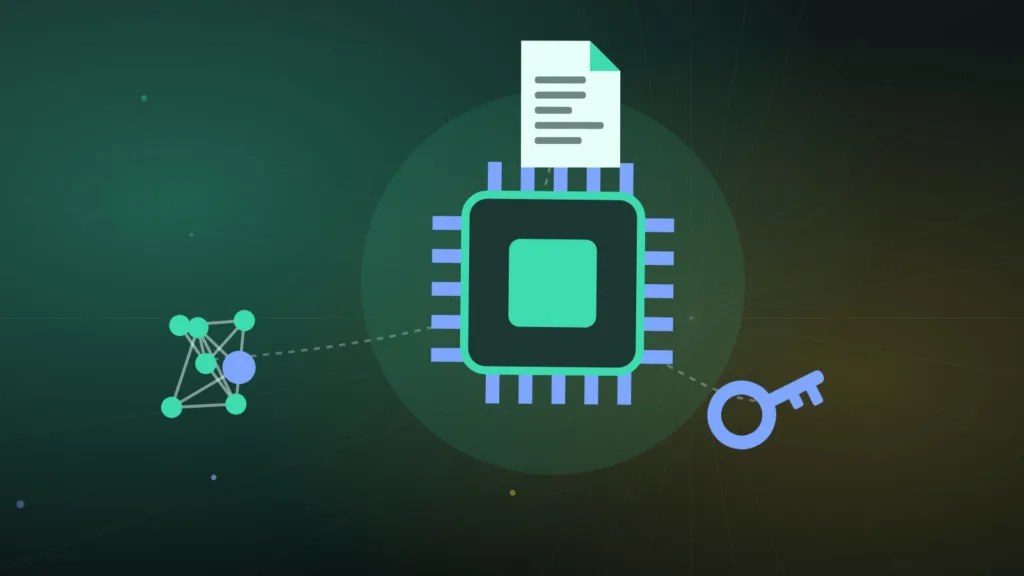
Spending from a multisig needs several signatures, made on separate devices that never touch each other’s keys. The format that carries the unsigned and half-signed transaction between them is the Partially Signed Bitcoin Transaction (PSBT), defined in BIP-174 and extended by BIP-370 (version 2). The coordinator creates the PSBT, each device adds its signature, and the coordinator combines them and broadcasts. Bitcoin Core 32.1 creates version 2 PSBTs by default. You move the file by microSD card, QR code or USB, depending on the device.
How a multisig works on Ethereum: Safe, a smart-contract account
Ethereum has no built-in multisig script. A multisig there is a Safe account (formerly Gnosis Safe), a blockchain that runs exactly as written when it is called, holding and moving funds according to its code, without an intermediary able to change the outcome.">smart contract that holds the funds and only executes a transaction when enough of its owners have signed it. Safe’s documentation describes the account as a contract whose ownership, thresholds, spending limits and recovery are programmable.
Each Safe is a small proxy contract pointing to a shared master contract, the singleton. The current contract version is 1.5.0, and 1.4.1 is still widely deployed. Safe’s public deployment registry lists the 1.5.0 proxy factory at the same canonical address on Ethereum, Sepolia, Base, Arbitrum, Optimism and Polygon, among many other networks. Owners are ordinary addresses, typically a hardware wallet each, and the threshold is a number stored in the contract. Safe’s help centre advises more than one signer and a threshold above one but below the total number of signers, with 2-of-3 as its example for an individual.
Because the account is code, it can be extended. Modules are contracts allowed to execute transactions without the usual signatures, which is how spending limits and recovery work; guards are contracts that check every transaction before or after it runs. Both are powerful and both are risks: a module with a bug or a malicious author can move funds without your quorum. Add only modules you understand, and check the list of enabled modules in your Safe’s settings from time to time.
Safe{RecoveryHub} is one such module. According to Safe’s help centre, a recoverer you choose (any wallet or another Safe) can replace the signers after a delay of 28 days by default, with 7, 14 or 56 days as other options. The current signers can reject the proposal during the delay, but the help centre says the interface sends no notification when a recovery is set up, proposed or executed, so someone has to watch. A recoverer you control yourself, such as a separate hardware wallet kept elsewhere, keeps the setup fully in your hands. Third-party recoverers exist; a firm that can replace your signers after a delay is a party you have to trust.
Gas is the other difference with Bitcoin. Creating a Safe and every later transaction cost gas, paid in ether by the account that submits it; our lesson on gas and EIP-1559 explains how the base fee is set. Safe itself charges nothing for creating an account.
Solana: Squads v4 and its vault address
On Solana the common multisig is Squads, whose current program is version 4, deployed on mainnet-beta under the program ID SQDS4ep65T869zMMBKyuUq6aD6EgTu8psMjkvj52pCf. Its open-source README lists time locks, spending limits, roles, sub-accounts and support for address lookup tables. You connect a wallet at the Squads app, add members by public key and set a threshold; the docs allow up to 10 members at creation, more added later by a multisig vote, and they warn against a 1-of-1 and against a threshold equal to the number of members. Time locks of 1 hour, 1 day, 1 week or a custom delay apply to every transaction once set.
Two warnings from Squads’ own pages matter more than any feature. The Squads v4 README says funds should always be sent to the multisig vault account and not to the multisig account address, and that funds sent to the wrong one may not be recoverable. The second concerns hardware wallets: Squads’ docs say Ledger’s direct connection is not supported, that a Ledger connects through Phantom or Solflare, and they tell users to “Enable Blind Signing on your Ledger device to ensure successful transaction signing.” Blind signing means the device cannot show what it approves, so the checking moves to the computer screen, the weakest place in the chain. Squads’ docs give the pricing as of 27 November 2026: a free Basic plan with a one-time deployment fee of 0.1 SOL (about $7.34 at that day’s Coinbase price), and a Pro plan at $49 a month.
Multisig, MPC and Shamir backups compared
Three techniques all promise that no single secret can lose your funds. They work in very different ways. A Shamir backup (SLIP-39, used by Trezor) splits one seed into shares, for example 2 of 3; the SatoshiLabs specification says fewer shares than the threshold reveal nothing about the secret, but at recovery the shares are combined on one device, so the full key exists there. MPC (multi-party computation) wallets split a key into shares held by different parties, often a phone and a company’s servers, which compute a signature together; the chain sees one ordinary key. NIST runs a project on these threshold schemes and published the final version of its first call for multi-party threshold schemes (NIST IR 8214C) in January 2026.
| Multisig (2-of-3) | MPC wallet | Shamir backup (SLIP-39) | |
|---|---|---|---|
| Where the keys live | Three full keys, each on its own device | Key shares on devices and servers | One seed, split into shares for storage |
| Is the whole key ever in one place? | Never: each key signs on its own | Not in normal use | Yes, at recovery |
| Seen on chain | Yes: script or contract visible | No: looks like one key | No: looks like one key |
| Chains | Bitcoin scripts, Safe on EVM, Squads on Solana; one setup per chain | Many chains with one provider | Any chain the wallet supports |
| Who you depend on | Open standards; coordinator software | The provider’s software and servers | The wallet maker’s implementation |
| Main weakness | Setup file, complexity, shared interfaces | Provider failure, no common export format | Single device at signing time |
How to set up a multisig wallet on Bitcoin: a 2-of-3 with Sparrow
Do the whole walkthrough once on testnet or signet, where coins are free and worthless, before sending a single real satoshi. Sparrow, Electrum, Nunchuk and Bitcoin Core itself can all act as coordinator; the steps below follow Sparrow, and Bitcoin Core’s own multisig tutorial on signet shows the same flow with commands for those who prefer a full node.
Before you start
- Get three hardware wallets from three different makers, each bought from its maker’s own shop; our guide to setting up a hardware wallet covers the genuine-device checks and the implanted-device case of autumn 2026.
- Set up each device on its own, with its own seed written by hand, and update its firmware and Bitcoin app.
- Install the coordinator from its official site and check the download signature.
- Write a plan on paper: which key goes where, who holds it, where each descriptor copy goes.
- Switch the coordinator and each device to testnet or signet for the rehearsal.
Sparrow’s best-practices page is direct about vendors: “You should be using hardware wallets from multiple vendors, ensuring that a vulnerability in one vendor does not completely compromise the setup.” A flaw in one maker’s firmware then reaches one key, not two.
Create the wallet and register it on each device
- In Sparrow, create a new wallet, choose multi-signature as the policy, native SegWit (P2WSH) as the script type, and set 2 of 3.
- For each keystore, connect the device (or import its file by microSD or QR) and let Sparrow read its xpub at the BIP-48 path; on signet and testnet the coin type is 1, so the path reads m/48’/1’/0’/2′.
- Note each device’s fingerprint as the device shows it, and check that the same three fingerprints appear in Sparrow.
- Apply the wallet, then register it on each signing device: export the setup file to devices such as COLDCARD, which import a descriptor or config file, and confirm the wallet policy on screen on devices such as Ledger, which ask you to register it before they sign.
- On each device, read the threshold, the script type and every fingerprint before you confirm.
Registration is what lets a device check, on its own screen, that a change output really returns to your wallet rather than to an address an attacker added. Sparrow 2.1.0 (February 2025) began storing Ledger registrations so the device does not ask again for every spend.
Back up the descriptor with every seed
Export the descriptor from Sparrow’s wallet export or its multisig backup dialog, as text, a QR code on paper, or a file. Put one copy with each seed backup, so any two of your three places can restore the wallet without the third. Because it shows your balances to whoever reads it, store it the way you would store a bank statement, not in a cloud folder shared with others.
Receive and check the address on two devices
Ask Sparrow for a receiving address, then display the same address on at least one, better two, of the hardware wallets. They compute it from the registered setup, not from what the computer says. COLDCARD’s documentation puts the habit in one line: “You should always cross-verify multisig addresses with your coordinator software.” Send a small test amount, then wait for it to confirm.
Spend with a PSBT and read it on each screen
- Create the transaction in Sparrow: destination, amount, fee rate.
- Pass the PSBT to the first device, read the destination, the amount, the fee and the change on its screen, and sign.
- Pass the half-signed PSBT to the second device, read the same details again, and sign.
- Back in Sparrow, check that the transaction is complete, then broadcast it.
Keep every part current. In January 2026 Trezor disclosed a bug in its multisig verification, since fixed, in which an attacker who controlled one cosigner and compromised Trezor Suite on the other signers’ computers could get a misleading display on the device, for example around a fee bump. Up-to-date firmware and coordinator software close holes of that kind.
Rehearse a recovery before real money
On a clean computer, install the coordinator again and restore the wallet from two seeds and one descriptor copy, leaving the third device in its drawer. Check that the balance and the addresses match, then spend the test coins. Only when that works, repeat the setup on mainnet and start with a small amount. If the rebuild fails on signet, the fault is in your backups, and signet is the cheap place to find it.
Step by step on Ethereum: a Safe on Sepolia, then mainnet or a layer 2
Create the Safe
- Open the Safe{Wallet} app by typing its address yourself, connect your first signer (a hardware wallet through a browser wallet) and pick Sepolia as the network.
- Name the account, add the owner addresses (your other hardware wallets, each address checked on its own screen) and set the threshold, for example 2 of 3.
- Review the summary, deploy, and pay the gas with Sepolia test ether.
- Once it works, repeat on Ethereum mainnet or on a layer 2 such as Base or Arbitrum, where gas is much lower.
The deployment cost is pure network gas. Reading Ethereum mainnet on 27 November 2026, a 2-of-3 Safe version 1.5.0 deployment used 304,860 gas; each extra owner adds roughly 22,000 to 27,000 gas. At 09:51 UTC the base fee was 0.078 gwei, which is unusually low, and ether traded at $1,728.95 on Coinbase. The table uses the base fee alone; the deployment we read added a priority tip and paid 0.235 gwei in all, about $0.12.
| Gas price (27 November 2026, ETH at $1,728.95) | Cost of a 2-of-3 Safe (304,860 gas) | In dollars |
|---|---|---|
| 0.078 gwei (Ethereum, 09:51 UTC) | 0.0000239 ETH | about $0.04 |
| 1 gwei (example) | 0.000305 ETH | about $0.53 |
| 10 gwei (example of a busy day) | 0.00305 ETH | about $5.27 |
| 0.006 gwei (Base, execution gas only) | 0.0000018 ETH | well under one cent, plus a small L1 data fee |
Add or remove signers and change the threshold
Adding an owner, removing one, swapping one or changing the threshold are functions the Safe contract only accepts from itself, so through the normal route each change is a Safe transaction that must reach the current threshold, and a single compromised owner cannot add a friend and take over. The exception is an enabled module: a module, such as the recovery module above, can call those same functions without the owners’ signatures, which is why the list of modules deserves the same care as the list of owners. Replace a lost key quickly: a 2-of-3 that has lost one key is a 2-of-2 until you fix it, and one more loss locks the funds.
First transaction: propose, sign, execute
One owner proposes the transaction, the others add their signatures, which Safe collects off chain, and whoever submits the final transaction pays the network gas from their own address, usually the last owner to sign. The signed data also carries refund fields (gasPrice, gasToken, refundReceiver): when gasPrice is above zero, the Safe pays the executor back from its own balance. Unless you set a refund on purpose, those fields should read zero on your device. Send a small amount to yourself first. Then check the Safe’s address on a block explorer, look at the owners and threshold the contract reports, and confirm they match your plan.
Check what each signer signs: the lesson of Bybit
Our case study of the biggest crypto hacks tells the story in full. On 21 February 2025 the signers of a Bybit cold wallet approved what looked like a routine transfer in the Safe{Wallet} interface, whose JavaScript had been altered after a Safe developer’s machine was compromised. The loss came to roughly $1.5 billion. The multisig counted the signatures correctly. Every signer looked at the same poisoned page.
The transaction the signers approved was a delegatecall, an operation that lets another contract run code inside the Safe; here it replaced the Safe’s logic. That gives a practical red flag: in a Safe transaction, an operation of 1 (delegatecall) to an address you do not know is a reason to stop.
Safe’s help centre lays out the checks. In the interface, read the destination (to), the value, the data, the operation (call or delegatecall) and the nonce, and open the simulation. On a hardware wallet that displays EIP-712 messages, check the same fields, plus the gas fields and the refund receiver. Then compare the transaction hash with an independent tool, run on your own computer, such as OpenZeppelin Safe Utils or the open-source safe-tx-hashes-util script. The Safe guide ends on one line: “If you can’t verify it, don’t sign it.”
Two signers who check on two different devices, against a hash computed by a third tool, are much harder to fool than three signers who trust one web page. Blind signing, where the device shows only a hash or nothing readable, removes the last independent screen; turn it on only when a wallet requires it, and keep the extra checks. Some products add clear-signing layers: Ledger launched its own Safe-based Ledger Multisig on 23 October 2025 for Ethereum, Arbitrum, Base, Polygon and Optimism, with a fee announced at a flat $10 per transaction or 5 basis points on token transfers, a model several crypto outlets reported users criticising at launch.

Collaborative custody: when a company holds one key
Some services sell a 2-of-3 or larger multisig in which the company holds one key and you hold the rest. The company cannot spend alone, and if you lose one of your keys, it can co-sign a move to a new setup. You pay for the help, and you depend on the service for those assisted parts. Prices below were read on each company’s pricing page on 27 November 2026; naming them is not a recommendation.
| Service | Model | Plans and prices (27 November 2026) |
|---|---|---|
| Casa | Vault of 3 or 5 keys; Casa holds a recovery key that cannot move funds by itself | Standard $250 a year (3-key vault), Premium $2,100 a year (5-key vault), Private Client $7,500 a year, Business $2,750 a year |
| Unchained | 2-of-3 Bitcoin vault: you hold two keys on separate hardware wallets, Unchained the third | Vaults $250 per vault per year; Signature $6,000 the first year then $4,500 a year; Bitcoin IRA $250 a year (US only) |
| Nunchuk | Free do-it-yourself multisig app; paid assisted wallets (Iron Hand: you supply two hardware keys for its 2-of-3) | Free; Iron Hand $120 a year (2-of-3); Honey Badger $480 a year (2-of-4, with an inheritance key); Honey Badger Premier $2,100 a year (3-of-5) |
Unchained says it checks the client’s identity and intent before it countersigns. All three sell inheritance features in some plans; how to pass a multisig on to heirs is the subject of the next lesson.
Mistakes that turn a multisig into a trap
- Keeping all three seeds, or two seeds and the descriptor, in the same house: one burglary or one fire reaches the quorum.
- Buying three devices from the same maker, so a single firmware flaw touches every key.
- Skipping the descriptor backup, then finding that two seeds cannot rebuild the wallet.
- Setting the threshold equal to the number of keys, such as 3-of-3: lose one key and the funds are locked.
- Never testing a recovery, so the first attempt happens under stress, years later.
- Running old firmware or an old coordinator, which leaves known bugs open.
- Signing with every key on one laptop, which brings back the single point of failure.
- On Solana, sending funds to the Squads multisig account address instead of the vault.
- Leaving no instructions, so nobody else knows where the keys are or how the setup works.
A 3-of-5 tolerates two lost keys instead of one, but it means five places to secure and three signatures for every spend. Unchained describes that extra operational burden in its own comparison. For most individuals, 2-of-3 is the common starting point; the right answer depends on how many trustworthy places and people you really have.
What a multisig costs: devices, network fees and subscriptions
The devices are the main one-off cost: three hardware wallets instead of one. After that, the fees depend on the chain. On Bitcoin a multisig spend is larger than a single-key one, because the witness carries two signatures and the whole script. A real 2-of-3 P2WSH spend with one input and two outputs, confirmed in block 977,789 on 27 November 2026, weighed 191.75 virtual bytes, against about 141 for the same single-key transaction. The fee is the size in vbytes times the fee rate in sats per vbyte, so you can redo the sum on a busy day.
| Item | Figure | Date and source |
|---|---|---|
| 2-of-3 P2WSH spend, 1 input, 2 outputs | about 192 vB, 192 sats at 1 sat/vB, about $0.12 | 27 Nov 2026, 09:50 UTC, mempool.space; BTC $61,589.99 (Coinbase) |
| Same spend at 20 sat/vB (example) | 3,840 sats, about $2.37 | Example rate, BTC price of 27 Nov 2026 |
| 2-of-3 Safe 1.5.0 creation on Ethereum | 304,860 gas, about $0.04 at 0.078 gwei | 27 Nov 2026, 09:51 UTC, Ethereum node; ETH $1,728.95 |
| Squads v4 deployment | 0.1 SOL one-time, about $7.34 | Squads docs and Coinbase SOL price, 27 Nov 2026 |
| Squads Pro | $49 a month | Squads docs, 27 Nov 2026 |
| Collaborative custody | from $120 to $7,500 a year | Nunchuk, Unchained and Casa pricing pages, 27 Nov 2026 |
Taxes and rules when you move your own coins into a multisig
Moving coins from your exchange account or your old wallet into a multisig you control is a transfer between your own wallets. In the United States the IRS answers this in its virtual currency FAQ (question 38): the transfer is a non-taxable event, “even if you receive an information return from an exchange or platform”. Keep your records of the original cost; our guide to crypto taxes in the United States covers what happens when you later sell.
In the United Kingdom, HMRC’s Cryptoassets Manual (CRYPTO22100) says: “There is no disposal if the individual retains beneficial ownership of the tokens throughout the transaction”, and gives moving tokens between addresses the person controls as its example. The network fee paid for the move is a separate question covered by each country’s rules.
On regulation, a multisig whose keys you hold yourself is self-custody, not a service. In the European Union, MiCA’s custody rules, in Article 75, apply to crypto-asset service providers that hold and administer crypto-assets on behalf of clients. Holding your own keys in a 2-of-3 is not that.
Before you move real money
Rehearse once on signet, testnet or Sepolia, from creation to recovery. Then move a small amount on mainnet, spend it, and only after that move the rest, in steps. Write down where each key and each descriptor copy is, and review it every year or whenever someone who holds a key moves house.
Your multisig also needs a plan for the day you are not there to sign. The next lesson of this path, on crypto inheritance planning, covers how heirs find the keys, the descriptor and the instructions, and what the law and the tax authorities expect when crypto passes on.